Your PC has problems.
Now you can see them.
CamSoft PC Doctor scans your Windows PC in seconds, scores its health from 0–100, and gives you one-click fixes — no tech skills required.
Windows 10 / 11 · No account required · Your data never leaves your PC
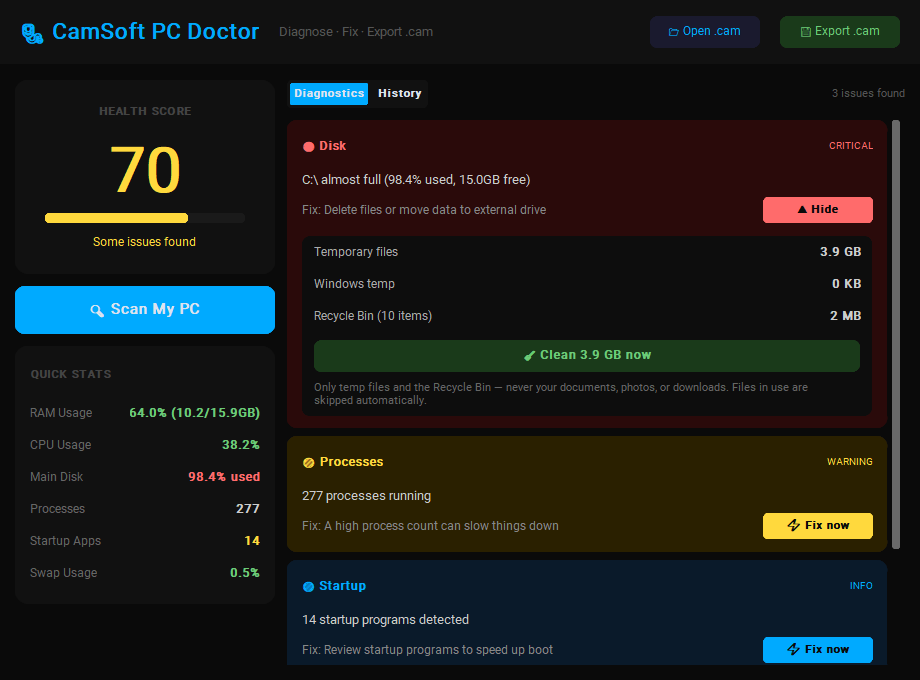
Everything wrong with your PC, on one screen
One scan checks the six things that actually slow computers down.
RAM & CPU pressure
See exactly how much memory and processor you're using — and get warned before things start freezing.
Disk space watchdog
Every drive checked, with critical alerts before a full disk breaks Windows updates and saves.
Temperature checks
Overheating kills performance and hardware. PC Doctor flags dangerous temps when sensors are available.
Startup bloat detection
Counts the programs hijacking your boot time and points you straight at the fix.
Real one-click fixes
Clean gigabytes of junk, close memory-hogging apps, and disable startup bloat — right inside the app, with a preview and confirmation before anything changes.
Health history
Every scan is saved. Watch your health score trend over weeks and prove your fixes actually worked.
The .cam report — a health record for your PC
Every scan can be exported as a portable .cam file. Send it to a technician, a friend who's good with computers, or keep it as a before/after record.
- ✔Open it anywhere. Double-click a .cam file or use Open .cam in the app to view any report — yours or someone else's.
- ✔Human-readable. Under the hood it's structured text, so nothing is hidden from you.
- ✔Perfect for remote help. "Send me your .cam" beats twenty screenshots and a phone call.
- ✔Private by design. Reports contain hardware stats only — no files, no browsing history, no personal data.
Three clicks to a healthier PC
Scan
Hit "Scan My PC". Ten seconds later you have a health score and a ranked list of everything wrong.
Fix
Hit "Fix now" on any issue — clean gigabytes of junk, end RAM hogs, or disable startup bloat without leaving the app.
Track
Rescan and watch your score climb. Your full history lives in the History tab.
Simple pricing. Pay once, keep it forever.
No subscription, no account, no upsells. Buy it, download it, it's yours.
Instant download after checkout
- Full CamSoft PC Doctor for Windows 10 / 11
- Unlimited scans, history & .cam exports
- One-click fixes for every detected issue
- Free v1.x updates
- Use on all PCs in your household
Secure checkout & instant delivery by Payhip · 30-day refund policy
Questions people ask
Does it send my data anywhere?
No. PC Doctor has no server, no account, and no analytics. Scans run locally and reports are saved on your own machine. The only way a report leaves your PC is if you export a .cam file and send it to someone yourself.
Will it work on my computer?
It runs on Windows 10 and Windows 11, as a single portable .exe — no installation required. Temperature readings depend on your hardware exposing sensors.
Does it actually fix things automatically?
Yes — since v1.1, PC Doctor fixes issues itself: it cleans temp files and the Recycle Bin, closes memory-hogging apps, and disables startup programs (reversibly). Every fix shows you exactly what will happen and asks for confirmation first — nothing is ever deleted or changed behind your back, and it never touches your documents, photos, or downloads.
What's a .cam file?
CamSoft's portable report format. It's a structured snapshot of one scan — score, stats, and issues — that anyone with PC Doctor can open. Great for getting remote help or keeping before/after records.
How do I get the app after I buy?
Checkout takes under a minute — the download link appears immediately after payment and is also emailed to you, so you can re-download any time. No account needed.
Why does Windows warn me when I run it?
Windows shows a SmartScreen notice for new software from small publishers until it builds reputation. Click "More info" → "Run anyway". The app is a single self-contained executable you can scan with any antivirus first.
Get CamSoft PC Doctor
One scan from now, you'll know exactly what's slowing your PC down.
⬇ Buy & Download — $14.99Windows 10/11 · 30 MB · portable .exe · instant delivery